 NexIP官方博客
Why are datacenter IPs easily flagged as high-risk? The core reason isn't that they're blacklisted, but that before any business behavior occurs on the connection, platforms have already assigned them a low initial trust score based on IP attributes. Cloudflare's Precursor detection system released in July 2026 and DataDome's AI traffic report from the same month both point to the same thing—risk control has shifted from static blacklists to joint end-to-end scoring, with ASN ownership and client signals being two key pieces of the puzzle. Below, we break down the five signals that platforms can read, each of which you can verify yourself.
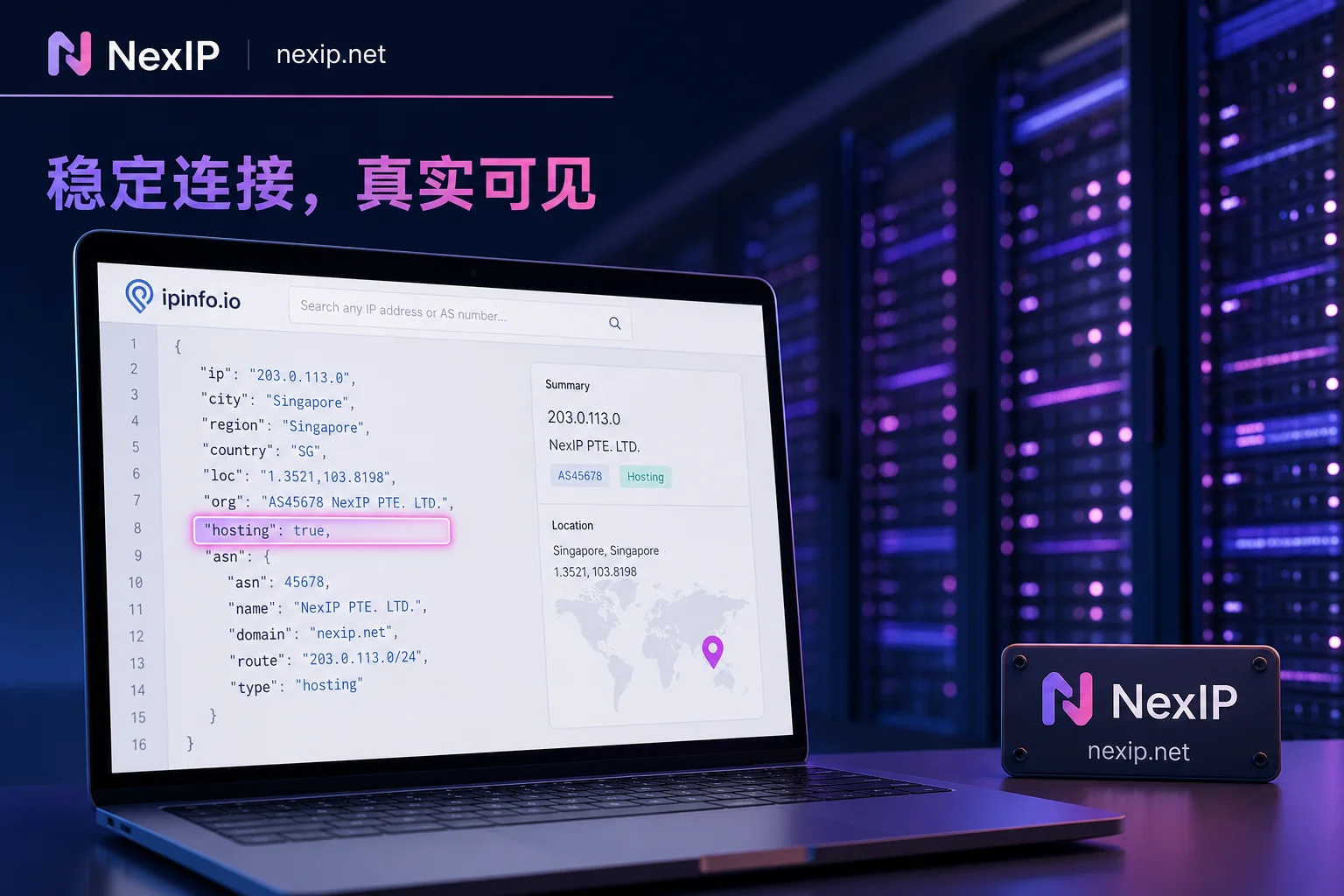
Signal 1: ASN Registration Entity and Hosting Flag – How to Check and What Indicates a Datacenter
Every IP range is registered under an Autonomous System (ASN), and the ASN registration info shows who operates it. Open ipinfo.io or a similar tool, enter your egress IP, and if the page shows hosting: true, you can basically conclude it's a datacenter or cloud provider range. A more direct field is the ASN's registered organization; common IDC or cloud vendor names are obvious at a glance, while ranges registered to residential ISPs (like local broadband operators) won't have this flag.
As discussed in the difference between residential and datacenter IPs, this flag is one of the earliest fields that platform risk control reads. It's like the IP's household registration; if it's registered under an IDC/cloud vendor, the initial trust score is naturally low.
Signal 2: Whois Ownership and Reverse DNS (PTR) – Do They Point to a Datacenter or Local Broadband?
Beyond ASN, the netname and org fields in Whois also reveal clues. Datacenter netnames often contain words like vps, cloud, or server, and the org often points to IDC or cloud service providers; residential segments typically show local ISP names, sometimes even down to the city.
Next, look at the reverse DNS (PTR) record. Datacenter IPs typically have PTR records similar to ip-203-0-113-25.host.example.com, while residential IPs often point to something like pool-xxx.ispname.net. Combining these two steps gives you a good idea of an IP's nature. After checking Whois/PTR, you can further verify the authenticity of residential segments by referring to how to detect if a residential IP is a real dual-ISP.
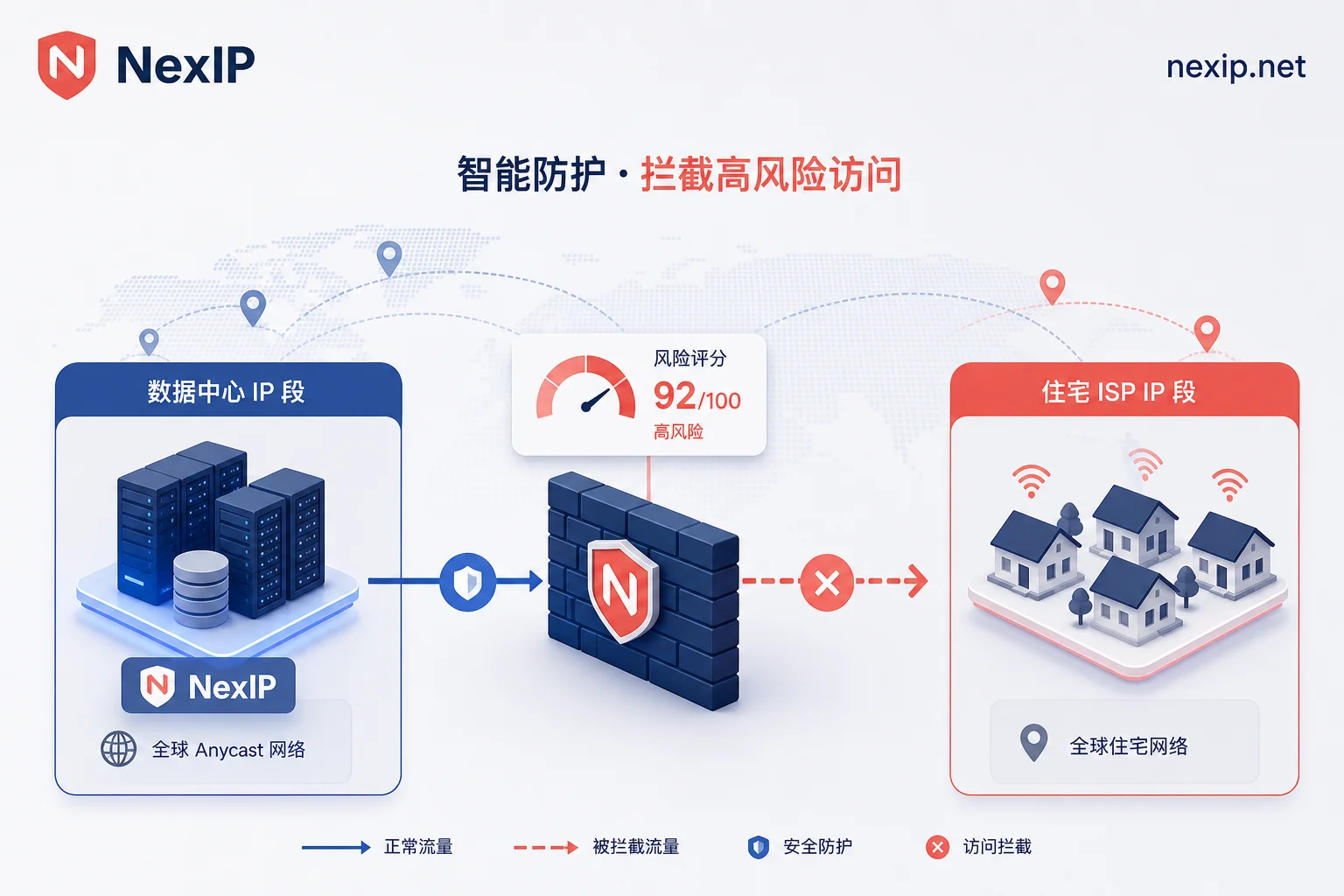
Signal 3: /24 Subnet Neighbor Composition – Why Datacenter Segments Naturally Carry Higher Risk
IP reputation isn't just about your own address; it also depends on the neighbors in your /24 subnet. Datacenters often cram many different users' machines into one subnet to make IPs reusable, and some of those neighbors might be running scrapers or sending spam. Platforms assess subnet reputation holistically—once a segment is flagged, the entire segment's risk rises collectively.
How to check? You can use bgp.he.net to reverse-look up the IP's prefix and /24 assignment, confirming the segment's registration entity and prefix size. Then use public IP reputation lookup sites (like AbuseIPDB or the Spamhaus IP lookup page) to spot-check a few neighbor IPs in the same segment for abuse records. If many neighbors are on abuse lists, the risk for that segment is basically confirmed.
So you'll notice that even if you buy a dedicated VPS, as long as your subnet neighbors' activities are unclean, you'll be affected. That's why some experienced users specifically request providers to avoid shared segments.
Signal 4: Connection Layer Features – Why TLS Fingerprints and RTT Differ from Residential Links
Besides IP attributes, the connection itself can give you away. Datacenter links typically have more stable and lower network latency (RTT), while residential broadband is more influenced by physical distance and exhibits more natural fluctuations. More critically, TLS fingerprints differ—different clients and browser versions expose different characteristics during the TLS handshake, and automated tools differ clearly from real browsers.
Mainstream risk control systems stack these continuous client signals with ASN attributes for real-time scoring. If you're using a datacenter egress and happen to run automated scripts, the two signals corroborate each other, and blocking can happen in milliseconds.
Signal 5: Initial Trust Score in Joint Scoring – What Continuous Signal Systems Have Changed
Back to the opening statement: datacenter IPs aren't blacklisted, but they get a low score at the start of the connection. These continuous signal systems no longer rely on single request judgments; instead, they continuously collect client behavior, TLS fingerprints, ASN attributes, and more to form dynamic scores. DataDome's Q2 2026 AI traffic report shows that AI agents and automated traffic grew by 45%, and platforms have tightened defenses across the board, making high-risk ASNs and mismatch-fingerprint proxy IPs more likely to be intercepted immediately.
This is why datacenter IPs are easily identified as high-risk—the decision happens at the scoring layer, not after you make a mistake. It also explains why datacenter IPs now "pop captchas on arrival"—because the initial trust score is low, platforms would rather verify multiple times than let a high-risk connection through.
Correction: Datacenter IP Flagged ≠ Definitely Banned; Residential IP Isn't Exempt Either
Being flagged as high-risk doesn't mean certain account bans. Often, platforms simply increase verification intensity, such as captchas or two-factor authentication, and after passing verification, the session can still proceed. However, if you're using a datacenter IP and it's persistently flagged, the probability of a ban is indeed higher over time.
Conversely, residential IPs aren't a silver bullet. If browser fingerprints, timezone/language, or operation frequency conflict with historical account behavior, the joint model will still block. This is where proxy IP anti-association becomes important. Specific scoring algorithms and thresholds aren't public, and so-called "risk score tables" circulating online are largely unreliable.
Tiered by Business Scenario: Which Cases Can Still Use Datacenter IPs, and When You Must Switch to Residential Egress
| Business Scenario | Datacenter IP Usability | Recommended Egress Type |
|---|---|---|
| Internal API testing, public data scraping without login | Usable, but may trigger frequent captchas | Dynamic residential bandwidth |
| Short-term operations like uploading products to store backends, checking orders | Higher risk, not recommended | Static short-lived residential IPs |
| Long-term login for e-commerce backends, social media account operations | Extremely likely to trigger risk control | Static long-lived residential IPs, one account per egress |
| Payment verification, account registration | High risk | Static long-lived residential IPs with ASN registered to residential ISP |
At the same time, correct a misconception: frequently changing IPs isn't safer. Under long-term login states, IP drift can break session consistency and trigger remote-location protection. Keeping one account bound to a stable residential egress is the compliant approach; the difference between static and dynamic IPs can help you understand the principles.
Mapping to NexIP: How Static Long-lived, Static Short-lived, and Dynamic Residential Bandwidth Divide Responsibilities
If you've verified and found your current datacenter egress isn't suitable for long-term login business, consider switching by phase. NexIP's static long-lived residential IPs suit scenarios like store backends and social media operations that need stable long-term logins—one account per egress; static short-lived IPs fit short-cycle needs like verification and registration; dynamic residential bandwidth facilitates high-concurrency scraping of public data.
NexIP supports targeting by region, city, or even ASN, and also provides SOCKS5 and API integration for tighter binding of your business and IP egress. But note: any IP is just one part of risk reduction and doesn't guarantee immunity from bans.
Five Fields to Verify at Once: Datacenter IP Self-Check Checklist
Combining all five signals into one table lets you answer the question of why datacenter IPs are easily identified as high-risk and pinpoint which factor is dragging down your score.
| Check Item | Where to Look | Datacenter Characteristics | Remediation Advice |
|---|---|---|---|
| ASN registration entity | ipinfo, bgp.he.net | IDC/cloud vendor name | Consider switching to residential ISP range |
| Hosting flag | ipinfo | hosting: true | Same as above |
| Whois netname/org | whois command | vps/cloud/server etc. | Same as above |
| PTR record | Reverse lookup of IP | Contains host/server etc. | Same as above |
| /24 neighbor reputation | AbuseIPDB, Spamhaus IP lookup page | Malicious records present | Switch IP range or provider |
Common Questions
Why does my datacenter IP pop captchas immediately?
Low initial trust score; platforms prefer verification over direct blocking. Datacenter IPs lack natural traffic characteristics, plus the ASN flag, making captchas the first gate.
What does it mean when ipinfo shows hosting?
It means the IP belongs to a datacenter or cloud provider, not residential broadband. The hosting flag is an important basis for risk scoring; seeing it allows you to basically determine it's a datacenter IP.
If ASN shows datacenter, can I still use it?
Yes, but only for low-risk scenarios like public data scraping or internal testing. For account logins, especially with payment features, it's recommended to switch to IPs with ASN registered to residential ISPs.
Will logging into a store backend with a VPS IP get me banned?
It's possible, depending on the strictness of the platform's risk control. If abnormal fingerprints or operation frequency are also present, the probability of captchas and bans increases. If it's just short-term trial, you could transition with static short-lived residential IPs.
How do platforms actually distinguish residential from datacenter IPs?
Mainly by ASN ownership, Whois and PTR records, and the reputation of same-subnet neighbors. Residential IP ranges are typically registered to local ISPs, and their /24 traffic behaves more like natural human activity.


Comments(0)