 NexIP官方博客
ChatGPT downgrade is not entirely an IP issue: restrictions on verification, image generation, and other functions are highly correlated with network exit, while subjective declines in answer quality more often come from account quotas, subscription status, or context compression in long conversations. To determine which category a ChatGPT downgrade belongs to, troubleshoot in three layers in order: symptom type, exit network attributes, and environment consistency. In the second half of 2026, access risk control on AI platforms has further tightened, and community feedback shows that the "downgrade" phenomenon is increasingly common.
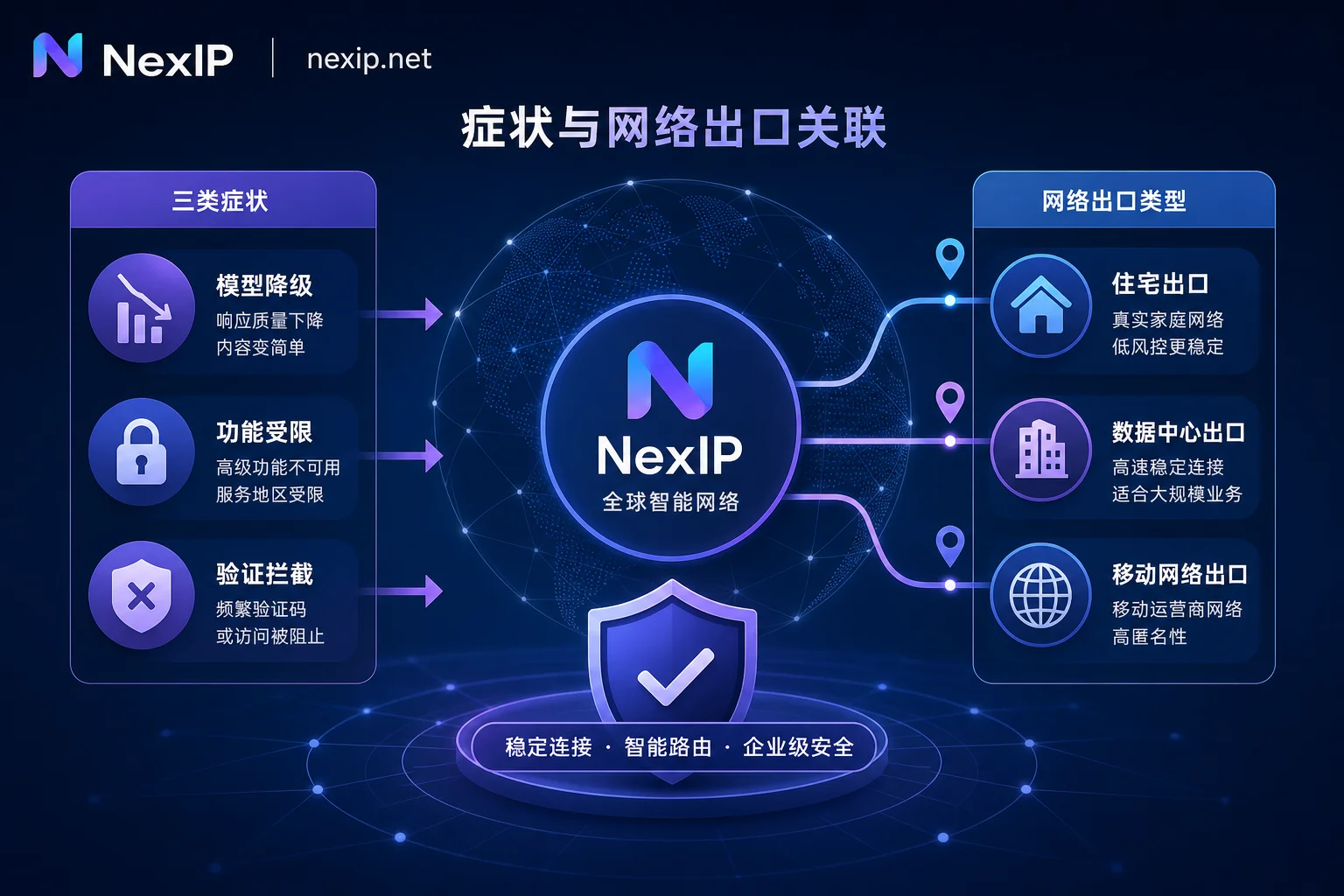
First, distinguish three types of symptoms: model degradation, function restrictions, and verification blocks each indicate different issues
Break down the community-called ChatGPT downgrade into three observable symptom types to quickly determine whether the problem lies in the network layer:
| Symptom Type | Typical Manifestations | Correlation with Network Exit |
|---|---|---|
| Model degradation | Automatic switch to mini or lower-tier models, decline in answer quality | Medium; also related to account usage and subscription status |
| Function restrictions | Image generation unavailable, file upload failures | High; often triggered by high-risk IPs |
| Verification blocks | Frequent CAPTCHA prompts, forced re-login | High; easily triggered by shared pool exits or location jumps |
Among these, verification blocks and function restrictions are highly correlated with the exit network, while subjective declines in answer quality are more likely related to account usage or subscription status. Categorize first, then troubleshoot, to avoid blindly switching nodes.
Why exit network affects experience: how ASN attributes and residential proxy behavior profiles are read
IP intelligence providers (such as MaxMind and IPinfo) updated their Residential Proxy detection databases in 2026, which can accurately identify residential proxy exits from multiple dimensions, including carrier registration information, active day ratio, device SDK behavior, etc. (MaxMind Residential Proxy Detection Practice Guide). This means that "whether it is a residential IP" is no longer only about location, but about the entity attributes and behavior profile of the exit. As for whether AI platforms directly adopt these labels and their weights, no platform has disclosed this, so this layer is inferential. Shared pool exits are more easily identified and restricted because of low active days and abnormal behavior characteristics. Third-party detection tools (such as Scamalytics) have disclosed multi-layer indicator logic.
First layer troubleshooting: check exit ASN registration entity and Hosting flag to determine if it is a datacenter exit
On ipinfo.io, scamalytics.com/ip, etc., view the current exit's ASN, registered organization name, and Hosting/Datacenter field. Interpretation rules: if the registered organization is a cloud provider or IDC name, it is considered a datacenter exit; if it does not match the local broadband carrier registration, it means traffic is not going through a residential exit. If it shows a datacenter attribute, it will default to a lower trust score, increasing the probability of restrictions, which answers the question "Will using a datacenter IP to log in to ChatGPT be restricted?" For related concepts, refer to Difference between residential IP and datacenter IP.
Second layer troubleshooting: whether the exit is in a shared pool or flagged subnet, and how to sample continuously for verification
Record the exit IP and ASN once in the early morning, noon, and evening for three consecutive days, noting whether there are jumps across /24 subnets. If the exit changes on multiple refreshes during the same time period, it means a rotating shared pool. Record the exit IP at different times to observe frequent changes, and check whether neighboring IPs in the same segment have risk labels. If the exit belongs to a rotating shared pool, it will have multi-user shared characteristics, making it easier to trigger restrictions. Also, do not misinterpret third-party "fraud scores": they are estimates based on multi-layer indicators, not actual blocking decisions, and a low score does not mean exemption from checks. See How to solve high proxy IP fraud scores.
Third layer troubleshooting: environment consistency—timezone, language, DNS resolution attribution, and IP corroborate each other
Check each item: system timezone setting, browser navigator.language, and the resolution exit attribution on DNS leak detection pages. If inconsistent, first correct the environment (adjust timezone, language, or routing rules), then observe the effect. Even with a residential exit, if the client environment is not self-consistent with the network, it may be downgraded. Common inconsistencies come from incomplete routing rules, DNS leaks, etc.
Correction: why frequent quick node switching makes restrictions harder to lift
This is also the most common misconception in ChatGPT downgrade troubleshooting. Many people ask, "Is it useful to change IP for ChatGPT downgrade?" Community and developer practical observations show that frequent switching to nodes in different locations forms multi-session location jump characteristics, making it more likely to be judged as scripted behavior, thus sustaining restrictions. The correct approach is to fix one exit and observe for at least 48 hours before evaluating whether there is improvement. This is a practical observation, not an official statement.
Factors beyond network: how to distinguish account usage, behavior, and subscription status
Exclude network factors: quota exhaustion triggers automatic switch to mini models, subscription status changes, and context compression in long conversations can all cause a subjective "becoming dumber." Use cross-validation: change devices/network for the same account and observe if there is a change; change accounts on the same network to see if it is consistent. This helps you locate the variable.
Choose exit tiers based on usage: long-term subscription login, multi-account separation, batch retrieval tasks
| Usage Scenario | Exit Requirements |
|---|---|
| Long-term subscription login | Stable and exclusive ownership, ASN registered as local broadband carrier, and maintain session stickiness (exit IP does not change mid-session) |
| Multi-account separation | Independent exits, no crossover |
| Batch retrieval tasks | Large pool rotation, account-independent |
Long-term login status especially requires session stickiness to avoid mid-session changes. These three types of needs should not be mixed on the same exit, otherwise they may interfere with each other. To understand the high-risk reasons of datacenter IPs, see Why datacenter IPs are easily identified as high-risk IPs.
Corresponding to NexIP: division of labor among static long-term, static short-term, and dynamic residential bandwidth
According to usage, you can match corresponding tiers: long-term login status suits static long-term residential IPs; temporary verification and multi-account separation suit static short-term; batch retrieval uses dynamic residential bandwidth. NexIP supports region selection, session stickiness, city/ASN targeting, and HTTP/SOCKS5 configuration for fine control. The exit tier only determines the stability and attribution attributes of the network layer; whether restrictions are ultimately triggered also depends on device fingerprint, account behavior, and platform policies. No exit can give a certain result.
Three rechecks after repair and a self-check checklist
| Check Item | Operation | Pass Standard |
|---|---|---|
| Exit ASN attributes | Query ASN registration entity | No Hosting/Datacenter flag |
| Exit stability | Record exit IP for 48 consecutive hours | No frequent changes |
| Environment consistency | Check timezone, language, DNS | All match IP location |
If all three pass and ChatGPT downgrade symptoms persist, the problem is not at the exit layer. Final tip: complete troubleshooting in the three-layer order, confirm the problem is indeed at the exit layer, then select the corresponding tier based on usage and try it on a small scale for verification. Do not switch nodes before troubleshooting.
FAQ
What should I do if ChatGPT suddenly becomes dumber?
Don't rush to change IP. First check if quota is exhausted or subscription is downgraded. If not, follow the three-layer troubleshooting method to check exit ASN, shared pool, and environment consistency. Community feedback shows that subjective "becoming dumber" often occurs after long conversation context compression or quota switches, not necessarily a network exit issue—this is a practical observation, and platforms have not disclosed their judging rules.
Why does ChatGPT automatically switch to the mini model?
Possible reasons: quota exhaustion (free users), subscription status changes, or the network exit being judged as high-risk. First check account status, then troubleshoot whether the exit ASN has a Hosting flag. If it is due to network, fixing a clean exit for a few days usually restores normal service.
How to solve frequent CAPTCHA prompts on ChatGPT?
This is a typical signal of high-risk network exit. Prioritize checking if you are using a datacenter IP or shared pool. Switch to a static residential IP and maintain environment consistency (timezone, language, DNS matching the IP), which usually reduces verification frequency.
What if ChatGPT image generation suddenly doesn't work?
Image generation restrictions are mostly triggered by high-risk IPs, different from model degradation. Immediately check the exit ASN attribute; if it is a datacenter, switch to a residential IP. Also confirm that the account has not been downgraded due to payment issues. Both approaches together can quickly locate the problem.
Is it useful to change IP for ChatGPT downgrade?
Changing IP only helps when you confirm the problem is at the exit layer—that is, if the first layer finds a datacenter ASN or the second layer confirms a shared pool. If the troubleshooting points to account quota or context, changing IP won't help; also, after switching to a new exit, you should fix it and observe for 48 hours. Frequent quick switching actually creates location jump characteristics.


Comments(0)